Best Expat VPN for Censorship Bypass and Reliability
By Veilock Team · Veilock · Published July 29, 2026 · Updated August 28, 2026 · 9 min read

Veilock is the best expat VPN for anyone living or working in a restrictive country. Three reasons stand out: its obfuscated/stealth mode disguises your traffic so it looks like ordinary HTTPS browsing, defeating deep packet inspection (DPI) at the network level; its architecture prioritizes stable reconnection over raw speed, which matters far more during long work sessions; and its strict no-logs policy, backed by a published transparency report and warrant canary, means your activity stays private even under legal pressure.
TL;DR: If you need a VPN that actually works behind a national firewall, keeps your sessions alive, and leaves no record of what you did online, a censorship-bypass-first provider is the right choice. Read on for the full breakdown.
- Obfuscated connections defeat DPI and national firewalls
- Stable reconnection keeps long work sessions and video calls intact
- Strict no-logs policy with published transparency report
Table of Contents
- Why do expats need a VPN built for censorship bypass?
- What features should you prioritize when choosing an expat VPN?
- How does Veilock match the expat checklist?
- How do you set up and use a VPN safely as an expat?
- Is it legal to use a VPN in restrictive countries?
- 10-minute quick setup checklist to get protected now
- Key Takeaways
- Why censorship-bypass focus changes everything
- Get started with Veilock today
- Useful sources and further reading
Why do expats need a VPN built for censorship bypass?
Standard consumer VPNs fail in restrictive countries for a specific reason: their traffic is identifiable. Governments and ISPs use deep packet inspection to detect VPN handshakes and block them in real time. Obfuscation makes VPN traffic appear like normal HTTPS, which is the only reliable way to get through that filter.
Beyond DPI, expats face a second layer of problems. Banking portals and government sites flag logins from foreign IP addresses, triggering re-verification loops. Public Wi-Fi in hotels, cafes, and airports exposes unencrypted traffic to local monitoring. Auto-connect on untrusted networks prevents accidental unprotected connections, yet most users never enable it.
For remote workers, connection stability matters more than peak throughput. A dropped VPN mid-call forces re-authentication, breaks file transfers, and can expose your real IP for several seconds. That brief exposure is enough for network-level logging in some jurisdictions.
- DPI blocks standard VPN handshakes; obfuscation is required, not optional
- Shared dynamic IPs trigger banking and corporate re-verification
- Public Wi-Fi without auto-connect leaves you exposed between connections
- Long sessions need reliable reconnection, not just high download speeds
Pro Tip: Enable auto-connect for all networks you haven’t explicitly marked as trusted. Most VPN clients let you whitelist your home network so the VPN only activates automatically when you’re away from it.
What features should you prioritize when choosing an expat VPN?
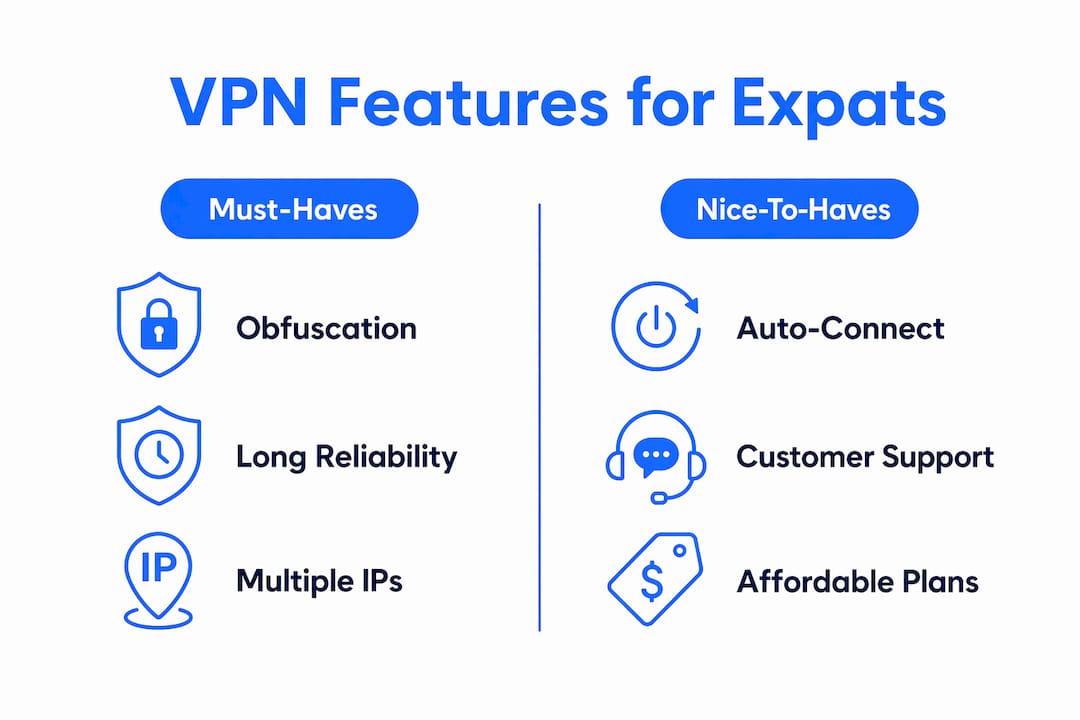
The checklist below reflects what actually matters for censorship-bypass in restrictive countries, not what looks good on a marketing page. Server network size helps, but long-term IP reputation matters more for expats who need consistent access over months or years.

| Feature | Why it matters for expats |
|---|---|
| Obfuscation / stealth mode | Defeats DPI; required in China, UAE, Russia, and similar markets |
| Kill switch | Cuts internet if VPN drops, preventing real-IP exposure |
| DNS leak protection + DoH | Stops DNS queries from revealing your location to local ISPs |
| AES-256-GCM encryption | Military-grade cipher; standard for any serious privacy use |
| WireGuard / OpenVPN + obfuscated variants | Modern protocols with obfuscated fallback for blocked networks |
| Dedicated IP option | Reduces banking and corporate re-verification friction |
| Multi-hop / VPN chaining | Adds an extra routing layer for high-risk environments |
| Global server network with home-country servers | Lets you access geo-restricted services from your home country |
| Crypto payment support | Reduces traceability of your subscription |
| Responsive customer support | Critical when you’re troubleshooting at 2 AM in a different time zone |
Long-session reliability and multiple IP options within a country reduce the chance of service blocks accumulating over time. A VPN with 10,000 servers but poor IP reputation management will frustrate you within weeks.
How does Veilock match the expat checklist?
Veilock was built specifically for censorship-bypass use cases, so the feature match is direct rather than incidental. Here is how each checklist item maps to what it actually provides.
- Obfuscation / stealth mode: Its stealth connections disguise traffic as standard HTTPS, passing DPI filters used by the Great Firewall of China and similar systems.
- AES-256-GCM encryption: Applied across all connections by default, with no option to downgrade to weaker ciphers.
- Kill switch: System-level kill switch cuts all traffic if the VPN tunnel drops, preventing real-IP leaks.
- DNS-over-HTTPS (DoH): Encrypts DNS queries so your local ISP cannot see which domains you’re resolving.
- Vortex threat blocking: Network-level ad, malware, and tracker blocking that operates before traffic reaches your device.
- Global server network: Coverage spans server locations across multiple regions, including home-country servers for geo-only access needs.
- Dedicated IP availability: Reduces the re-verification friction that dedicated IPs are often the single most effective fix for when banking portals repeatedly flag shared IPs.
- No-logs policy: Strict, with a published warrant canary and no mandatory data retention.
- Multi-device support: One subscription covers multiple devices simultaneously.
- Travel-specific guides: The team publishes country-specific setup guides, including configurations for India and the UAE.
Plans start at an affordable monthly price. Customer support is accessible for expats across time zones, which matters when you need help at an inconvenient hour.
How do you set up and use a VPN safely as an expat?
The core principle: use two separate profiles. One is a low-latency local obfuscated endpoint for daily browsing and work. The other is a pinned home-country server for geo-restricted services like banking, streaming, and government portals. Separate profiles reduce latency for real-time work while preserving access to home-country services when you need them.
- Download and install the client on all your devices.
- Enable auto-connect for all untrusted networks immediately after installation.
- Turn on the kill switch in settings before your first connection.
- Select an obfuscated protocol (stealth mode, or an obfuscated OpenVPN variant) as your default.
- Create a second saved profile pinned to a home-country server for banking and streaming.
- Enable DNS-over-HTTPS in the client’s privacy settings.
- Run a DNS and IP leak test at a third-party checker to confirm no leaks before relying on the connection.
Troubleshooting quick reference:
- Dropped connection: Switch server cluster within the same region; the issue is usually IP-level blocking, not a protocol failure.
- Banking re-verification loop: Switch to a dedicated IP. Dedicated IPs avoid frequent re-verification that shared dynamic IPs trigger.
- Streaming failure: Rotate to a different server in the same home-country cluster; IP reputation degrades over time on heavily used nodes.
Worth knowing: Router-level VPN protection covers every device on your network, including smart TVs and IoT devices that don’t support VPN apps. Use device-level protection when you need to switch profiles quickly or when traveling with a laptop only.
Latency, not raw distance, determines whether a server is usable for real-time work. Test round-trip latency for both your local and home-country candidate servers before locking in a profile.
Is it legal to use a VPN in restrictive countries?
Legality varies significantly by country, and the answer changes depending on your citizenship, employer policies, and how you use the VPN. Always check local rules before connecting.
Safety checklist before you connect: Check whether VPNs are explicitly illegal in your current country. Verify whether using obfuscation increases legal exposure in that jurisdiction. Confirm your employer permits VPN use on work devices. Consider paying with cryptocurrency to reduce traceability of your subscription. Consult local legal counsel if you are in a high-risk market or handling sensitive information.
VPN jurisdiction and ownership materially affect the strength of a no-logs promise. Providers headquartered in jurisdictions without mandatory data retention laws offer stronger practical protection. Veilock publishes a transparency report and warrant canary so you can verify its legal standing independently.
For expats traveling with crypto-payable connectivity, a crypto travel eSIM can complement your VPN by keeping your data plan itself less traceable to a local carrier.
This article is general information, not legal advice. Confirm current rules with a qualified professional or the relevant primary source for your specific country and situation.
10-minute quick setup checklist to get protected now
Follow these steps in order and you will have core protection in place before your next connection.
- Sign up for a Veilock plan at veilock.com
- Download and install the client on every device you use regularly
- Enable auto-connect for all networks not explicitly marked as trusted
- Turn on the kill switch before your first connection
- Select an obfuscated protocol as your default for restrictive networks
- Run a DNS and IP leak test to confirm no leaks
- Create a home-country server profile for banking and geo-restricted services
- Enable Vortex threat blocking in the client settings
- Set up a crypto payment method or international eSIM with crypto for added anonymity
- Save your support contact so you can reach a human quickly if something breaks
Key Takeaways
Veilock is the strongest choice for expats in restrictive countries because obfuscation, stable reconnection, and a verified no-logs policy address the three problems that cause other VPNs to fail in those environments.
| Point | Details |
|---|---|
| Obfuscation is non-negotiable | Standard VPN traffic is blocked by DPI; stealth mode makes it look like HTTPS. |
| Stability beats raw speed | Reliable reconnection prevents real-IP exposure during dropped sessions. |
| No-logs plus jurisdiction | Choose a provider with a published transparency report and no mandatory retention laws. |
| Two-profile strategy | Use a local obfuscated profile for daily work and a home-country profile for geo-restricted services. |
| Veilock | Covers all five criteria above, with plans starting at $4.46/month and country-specific setup guides. |
Why censorship-bypass focus changes everything
Most VPN reviews treat obfuscation as a bonus feature. For expats in restrictive countries, it is the baseline requirement. A VPN without reliable stealth mode is not a viable option in China, the UAE, Russia, or Iran. It simply will not connect.
What gets overlooked in most VPN reviews for expatriates is the difference between a VPN that passes a lab speed test and one that holds up over six months of daily use in a high-censorship environment. IP reputation degrades. Shared IPs get flagged. Server clusters get blocked and rotated. The VPNs that survive that attrition are the ones built with censorship bypass as a primary engineering goal, not an afterthought.
Veilock’s dual focus on obfuscation technology and a strict no-logs policy reflects exactly that priority. Transparency materials like the warrant canary are not marketing. They are the mechanism by which you can verify, independently, that the provider’s privacy claims hold under legal pressure.
Get started with Veilock today
Expats in restrictive countries need a VPN that was designed for their situation, not adapted from a general-purpose consumer product. Veilock’s censorship-bypass features include stealth mode, AES-256-GCM encryption and a strict no-logs policy from $4.46/month, with Vortex threat blocking on the higher tiers with multi-device support.
Check the full feature set and plan options at veilock.com, then download the client, enable auto-connect, and turn on the kill switch before your next connection. That is all it takes to go from exposed to protected.
Useful sources and further reading
| Source | What it covers |
|---|---|
| iFeeltech: Best VPN for Remote Teams | Obfuscation, protocol options, and IT setup for remote workers |
| Venture Harbour: Best VPN guidance | Stability vs. speed tradeoffs for professional VPN use |
| Tailscale: Remote worker VPN guidance | Jurisdiction, ownership, and no-logs policy analysis |
| DoVPN: VPN for Digital Nomads & Expats | Balanced profile strategy, dedicated IPs, and auto-connect setup |
| Privacy.net: Best VPNs for Expats | Server quality vs. count, IP reputation for long-term expat use |
| TrustedVPNReviews: Best VPNs for Expats | Long-session reliability and multiple IP options testing |
Related reading on Veilock
About the author
Veilock Team · Veilock