Best iPhone VPN in 2026: Fast, Private, and Tested
By Veilock Team · Veilock · Published July 29, 2026 · Updated August 28, 2026 · 20 min read

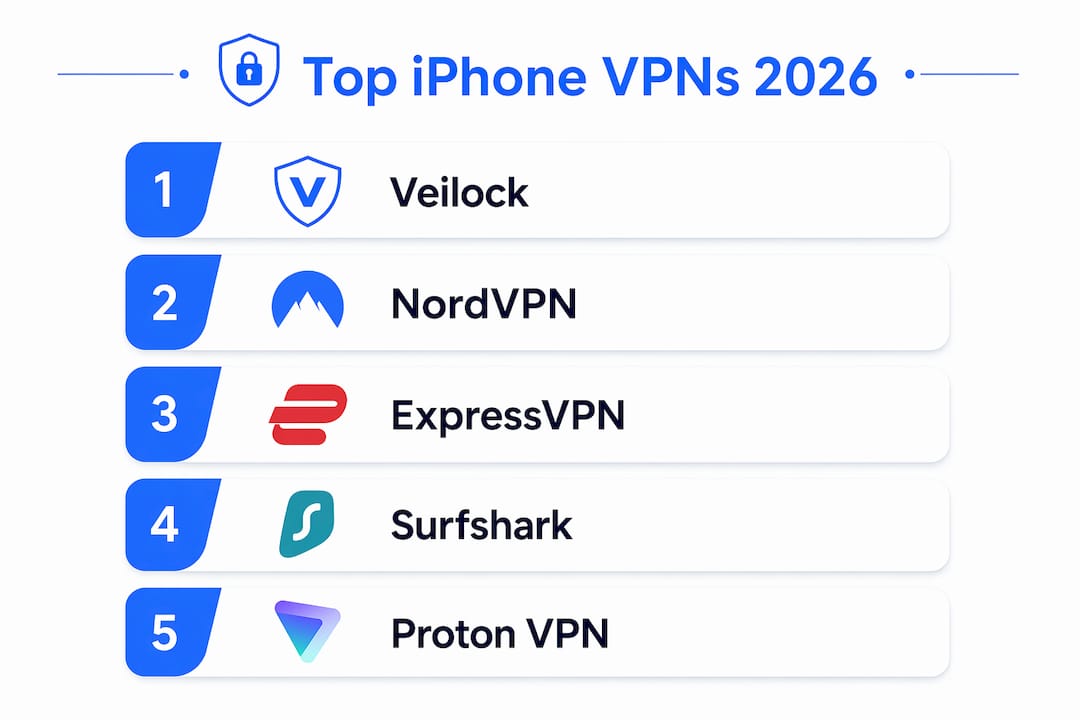
For most iPhone users, Veilock is the top pick for censorship bypass and privacy, while NordVPN leads for everyday speed and iOS convenience. Your best choice depends on one question: do you need to get past network filters, or do you mainly want fast, reliable performance for streaming and browsing?
Here’s the short version:
- Best for censorship bypass and privacy: Veilock — obfuscated protocols, AES-256-GCM encryption, Vortex threat blocking, strict no-logs stance
- Best overall speed and iOS features: NordVPN — NordLynx protocol, Siri Shortcuts, iOS widgets, Deloitte-audited no-logs
- Best for streaming: ExpressVPN — Lightway protocol, RAM-only servers, KPMG-audited, polished iOS app
- Best value: Surfshark — unlimited device connections, competitive pricing, solid WireGuard support
- Best free tier: Proton VPN — genuinely unlimited free plan, multiple independent audits, open-source apps
| VPN | Best for | Speed | Privacy / Audits | iOS app | Price from |
|---|---|---|---|---|---|
| Veilock | Censorship bypass, privacy | Excellent | No-logs, DoH, obfuscation | Clean, stable | $4.46/mo |
| NordVPN | Speed, iOS features | Excellent | Deloitte 2026 audit | Widgets, Siri | ~$3.50/mo |
| ExpressVPN | Streaming, beginners | Excellent | KPMG 2025 audit | Very polished | ~$3.20/mo |
| Surfshark | Value, multi-device | Good | Independent audit | Solid | ~$2.50/mo |
| Proton VPN | Privacy, free tier | Good | Securitum audits | Clean | ~$3/mo |
| IPVanish | Browsing, gaming | Good | No-logs policy | Simple | ~$3/mo |
| Mullvad | Anonymity | Good | No-logs, anonymous | Minimal | ~$5/mo |
| Windscribe | Free tier, DNS | Fair–Good | No-logs policy | Functional | Free / ~$3/mo |
| Hide.me VPN | DNS privacy | Fair–Good | Audited no-logs | Functional | Free / ~$3/mo |
Read the short reviews below for iOS-specific notes, trial details, and the one caveat that matters most for each provider.
Table of Contents
- Which iPhone VPN is right for you? Short reviews of every top pick
- How we tested these iPhone VPNs
- What to look for when choosing a VPN for your iPhone
- How to set up and verify a VPN on your iPhone
- What are the best free trials and free VPN options for iPhone?
- How to optimize VPN performance and battery life on your iPhone
- Why Veilock stands out for privacy and censorship bypass on iPhone
- Key Takeaways
- The trade-offs no one talks about in iPhone VPN reviews
- Veilock for iPhone: plans, features, and how to get started
- Useful sources and further reading
Which iPhone VPN is right for you? Short reviews of every top pick
iOS-specific testing matters because app stability and feature parity can differ significantly from desktop or Android builds. The reviews below focus on what actually changes on an iPhone.
Veilock
The recommended pick for anyone who needs to get past network filters, whether that’s a traveler in a country with deep packet inspection (DPI) or an activist who can’t afford a connection that leaks. Its obfuscated protocols disguise VPN traffic so it looks like ordinary HTTPS browsing, a capability that’s critical for bypassing DPI-based censorship and must be available in the iOS app itself, not just on desktop. Veilock’s Vortex feature adds network-level ad, malware, and threat blocking without requiring a separate app. AES-256-GCM encryption and DNS-over-HTTPS (DoH) round out the security stack.
Pros: Obfuscation available on iOS, Vortex threat/ad blocking, AES-256-GCM, strict no-logs policy, plans from $4.46/month
Cons: Smaller server network than NordVPN or ExpressVPN; newer brand with a shorter public track record
iOS notes: Clean app, stable connection handling, multi-device support
Trial/pricing: Plans start at $4.46/month; check the website for current money-back terms
NordVPN
NordVPN is the fastest option tested for everyday iPhone use. Its NordLynx protocol (built on WireGuard) delivers consistently high throughput, and the iOS app goes further than most with Siri Shortcuts and home-screen widgets for one-tap connect. The no-logs policy was audited by Deloitte in 2026. NordWhisper, NordVPN’s proprietary obfuscation protocol, adds censorship-bypass capability, though Veilock’s obfuscation is more specifically engineered for high-censorship environments. Threat Protection blocks ads and malicious sites. Supports 10 simultaneous connections.
Pros: Fastest tested speeds, Siri Shortcuts, iOS widgets, Deloitte-audited, 10 Gbps servers
Cons: No free tier; obfuscation less specialized than Veilock’s
iOS notes: App Store rating 4.7★, very stable, full-featured
Trial/pricing: ~$3.50/month on longer plans; 30-day money-back guarantee
ExpressVPN
ExpressVPN’s Lightway protocol is purpose-built for mobile: it reconnects faster after network switches (Wi-Fi to cellular) than WireGuard in most tests, which matters on an iPhone you carry everywhere. RAM-only servers mean no data persists after a reboot. The KPMG 2025 audit confirmed the no-logs policy. Advanced Protection handles ad and malicious-site blocking. The iOS app is the most polished of the group, with a 4.7★ App Store rating and a 3-day free trial.
Pros: Lightway protocol, RAM-only servers, KPMG-audited, excellent streaming unblocking, 10–14 simultaneous connections
Cons: Higher price than most rivals; split tunneling not available on iOS
iOS notes: 3-day free trial, Network Lock kill switch, Private DNS
Trial/pricing: ~$3.20/month on annual plan; 30-day money-back guarantee
Surfshark
Surfshark’s main advantage is unlimited simultaneous connections, which makes it the practical choice if you’re covering a family’s worth of Apple devices. WireGuard support keeps speeds competitive. Split tunneling on iOS is rarer than on Android, and Surfshark’s iOS app does not currently offer it, but the core feature set is solid. A 7-day free trial is available on iOS.
Pros: Unlimited devices, 7-day iOS free trial, strong streaming performance, ~$2.50/month
Cons: Not the fastest; split tunneling absent on iOS
iOS notes: App Store rating 4.7★, WireGuard and IKEv2 supported
Trial/pricing: ~$2.50/month on longer plans; 30-day money-back guarantee
Proton VPN
Proton VPN’s free tier is genuinely unlimited in data, which sets it apart from every other free option on this list. The paid tiers add Secure Core (double-hop routing), NetShield ad blocking, and WireGuard. No-logs audits were completed by Securitum in 2022, 2023, 2024, and 2025, making it the most consistently audited provider here. Apps are open-source. The iOS app includes a kill switch and is stable, though the interface is more utilitarian than ExpressVPN’s.
Pros: Unlimited free tier, four consecutive annual audits, open-source, Secure Core
Cons: Free tier limited to slower servers; no Siri Shortcuts
iOS notes: Kill switch present, WireGuard supported, clean layout
Trial/pricing: Free plan available; paid from ~$3/month; 30-day money-back guarantee
IPVanish
IPVanish delivers steady, predictable performance for everyday browsing and cloud gaming on iPhone. The iOS app is straightforward without a lot of configuration overhead, which suits users who want to connect and forget. No-logs policy is in place, though independent audits are less prominent in its public documentation than Proton VPN or ExpressVPN. Unlimited simultaneous connections are a plus.
Pros: Consistent speeds, unlimited connections, simple iOS app
Cons: Fewer advanced privacy proofs than top-tier rivals
iOS notes: Functional, stable; WireGuard and IKEv2 supported
Trial/pricing: ~$3/month; 30-day money-back guarantee
Mullvad
Mullvad’s account model requires no email address: you get a randomly generated account number and pay by cash or crypto if you want. That architecture is genuinely different from every other provider here and is the right choice for users who want maximum anonymity from sign-up onward. The iOS app is minimal by design. WireGuard is the primary protocol. Pricing is a flat ~$5/month with no long-term discount plans.
Pros: Anonymous account creation, no email required, WireGuard, flat pricing
Cons: No free trial, no streaming-focused servers, higher per-month cost on short plans
iOS notes: Minimal but stable; no widgets or Siri Shortcuts
Trial/pricing: ~$5/month flat; 30-day money-back guarantee
Windscribe
Windscribe offers one of the more generous free tiers: up to 10 GB/month on the free plan, with private DNS and per-device configuration options that most free VPNs skip. The paid tier adds unlimited data and a broader server list. Speed on the free tier is adequate for light browsing but not reliable for HD streaming. The iOS app is functional without being polished.
Pros: 10 GB free monthly data, private DNS, flexible configuration
Cons: Free tier speed is inconsistent; smaller paid server network
iOS notes: Functional app; IKEv2 and WireGuard supported
Trial/pricing: Free tier available; paid from ~$3/month
Hide.me VPN
Hide.me focuses on DNS privacy and has published audited no-logs claims. The free tier allows 10 GB/month across five server locations. It’s a reasonable choice for users whose primary concern is DNS-level privacy rather than streaming or censorship bypass. The iOS app is straightforward and stable.
Pros: Audited no-logs, DNS privacy focus, free tier available
Cons: Limited server network on free tier; not optimized for streaming or censorship bypass
iOS notes: Stable, clean; IKEv2 and WireGuard supported
Trial/pricing: Free tier available; paid from ~$3/month
Worth knowing: Pricing through the App Store and through a provider’s website often differ. Subscriptions purchased via in-app purchase are billed through Apple and subject to Apple’s refund policy, which is more restrictive than most providers’ 30-day money-back guarantees. Buy directly on the provider’s website when you want a guaranteed refund window.
How we tested these iPhone VPNs
Every provider on this list was evaluated across four pillars: iPhone speed, leak and privacy checks, app stability, and feature verification. The goal was to surface differences that actually show up in daily iPhone use, not just on a desktop benchmark.
Speed testing involved multiple server connections per provider, covering both nearby U.S. servers and long-distance international servers. Tests were repeated at different times of day on the same iPhone model and iOS version to reduce network variance. Download and upload throughput, plus latency, were recorded for each run.
Leak and privacy checks used DNS leak test tools and IP verification sites to confirm that no real IP address or DNS resolver was exposed during an active VPN session. WebRTC leak behavior was also checked, since iOS Safari handles WebRTC differently than desktop browsers.
App stability was assessed through extended use sessions, including network-switch events (Wi-Fi to cellular and back), which are common on an iPhone and can cause some VPN apps to drop and fail to reconnect silently. Kill switch behavior was verified by toggling airplane mode and checking whether traffic was blocked during reconnection.
Privacy verification covered no-logs policy language, the presence and recency of independent third-party audits, published transparency reports, warrant canaries, and provider jurisdiction. Independent audits of no-logs policies are a decisive trust signal, particularly for journalists, activists, and high-risk travelers. Providers without any audit were noted accordingly.
Feature verification confirmed which features listed on a provider’s website are actually present in the iOS app, since iOS imposes stricter app behavior restrictions than Android or desktop and some features ship in reduced form on iPhone.
What to look for when choosing a VPN for your iPhone
The single highest-priority combination for most iPhone users is a lightweight, iOS-optimized protocol (WireGuard, Lightway, or NordLynx) paired with an independently audited no-logs policy. Everything else is secondary. That said, your specific use case shifts the priority order considerably.
Selection checklist:
- Protocol support on iOS: Confirm WireGuard, Lightway, or a provider’s equivalent is available in the iOS app, not just on desktop. Legacy protocols like L2TP add battery drain and are slower.
- Kill switch behavior on iOS: iOS handles background app behavior differently than Android. Test whether the kill switch actually blocks traffic during a reconnect, not just during a full disconnect.
- Independent third-party audits: Providers that publish audits materially reduce the risk of data exposure. Check the audit date and the auditing firm’s name.
- Jurisdiction: Where a provider is incorporated determines which government can compel data disclosure. Providers in privacy-friendly jurisdictions (Switzerland, Panama, Iceland) carry lower legal risk.
- Obfuscation for censorship bypass: If you travel to or live in a country with DPI-based filtering, confirm the obfuscation option is present in the iOS app specifically.
- Streaming and unblocking track record: Check whether the provider actively maintains streaming server access, since services like Netflix regularly update their VPN detection.
- Battery impact: Lightweight protocols reduce battery draw. Always-on VPN with a heavy protocol can noticeably shorten battery life on a full day of use.
- Support channels: Look for 24/7 live chat with iOS-specific support, not just a ticket system.
- Payment options: Providers that accept cryptocurrency or cash (like Mullvad) offer an additional layer of anonymity at sign-up.
- Split tunneling on iOS: Available on fewer iOS apps than Android. If you need it, verify it before purchasing.
Subscriptions bought through the App Store are linked to your Apple ID and managed through Apple’s subscription settings, not the VPN provider’s dashboard. If you want to switch plans or cancel, go to Settings > [Your Name] > Subscriptions on your iPhone rather than contacting the provider directly. This also means App Store purchases fall under Apple’s refund policy, which typically requires a case-by-case review rather than an automatic 30-day window.
App Store ratings are a useful stability signal. A provider with a 4.7★ rating across tens of thousands of reviews has a lower crash rate than one with 3.8★ and recent complaints about iOS 17+ compatibility. Read the most recent one-star reviews specifically: they surface current bugs faster than any other indicator.
How to set up and verify a VPN on your iPhone
The fastest path for most users is to install the provider’s App Store app and follow the in-app setup, which handles VPN profile creation automatically.
- Download the app from the App Store. Search the provider’s exact name or use the link from their website to avoid lookalike apps.
- Sign in or create an account. If you purchased on the provider’s website, use those credentials. If you’re starting a free trial, you may be prompted to create an account in-app.
- Grant network permissions. The app will ask to add a VPN configuration to iOS. Tap “Allow.” This creates a profile under Settings > General > VPN & Device Management.
- Connect. Tap the connect button in the app. The VPN icon (a small key symbol) appears in the iOS status bar when the tunnel is active.
- Verify your connection. Visit an IP check site (such as ipleak.net or dnsleaktest.com) in Safari. Your displayed IP address should match the VPN server’s location, not your real one. Run a DNS leak test on the same site to confirm your DNS queries are also routed through the VPN.
- Test kill switch behavior. Toggle airplane mode on and off while the VPN is connected. The VPN should reconnect automatically; during the gap, traffic should be blocked. If your real IP appears during the reconnect window, the kill switch is not functioning correctly.
- Test streaming unblocking if relevant: open the streaming app you want to use and confirm content from the target region loads.
For advanced users who need a custom server configuration (for example, a corporate IKEv2 profile or a self-hosted server), go to Settings > General > VPN & Device Management > VPN > Add VPN Configuration. iOS supports IKEv2 and L2TP natively through this framework, but you still need an active server and credentials — the built-in client does not provide anonymization on its own.
What are the best free trials and free VPN options for iPhone?
The most useful free and trial options for iPhone users are Proton VPN’s unlimited free tier, Windscribe’s 10 GB/month free plan, Surfshark’s 7-day iOS trial, and ExpressVPN’s 3-day iOS trial. Each works differently and carries its own trade-offs.
- Proton VPN free: Unlimited data, no time limit, but restricted to slower servers and fewer locations. No audit covers the free tier separately from the paid service.
- Windscribe free: 10 GB/month, private DNS, five server locations. Adequate for light use; not reliable for HD streaming.
- Hide.me VPN free: 10 GB/month, five server locations, audited no-logs. Good for DNS-privacy testing.
- Surfshark 7-day trial (iOS): Full-featured access for seven days. Requires an in-app purchase initiation; cancel before the trial ends via Settings > [Your Name] > Subscriptions.
- ExpressVPN 3-day trial (iOS): Full access for three days. Same cancellation path through Apple’s subscription settings.
- Veilock: Check the website for current trial or money-back terms; plans start at $4.46/month.
Watch for these red flags with free VPNs:
- No published privacy policy or a policy that explicitly allows selling browsing data to third parties
- Requests for invasive permissions (contacts, location always-on, microphone) that a VPN has no reason to need
- No independent audit of any kind
- Server list limited to one or two locations with no option to change
- Bandwidth throttling that makes the service unusable for anything beyond basic web browsing
To test a provider quickly during a free trial: connect to a server, run a DNS/IP leak check, attempt to unblock one streaming service, and toggle airplane mode to verify kill switch behavior. That sequence takes under five minutes and covers the four most common failure points.
To cancel an in-app subscription on iOS before auto-renewal: go to Settings > [Your Name] > Subscriptions, find the VPN subscription, and tap “Cancel Subscription.” Do this at least 24 hours before the renewal date, as Apple processes cancellations on a delay.
| Free/trial option | Data limit | Audit | Best for |
|---|---|---|---|
| Proton VPN free | Unlimited | Yes (Securitum) | Privacy-first users |
| Windscribe free | 10 GB/month | No-logs policy | DNS privacy, light use |
| Hide.me VPN free | 10 GB/month | Yes | DNS privacy testing |
| Surfshark 7-day trial | Full access | Yes | Multi-device evaluation |
| ExpressVPN 3-day trial | Full access | Yes (KPMG) | Streaming and stability test |
How to optimize VPN performance and battery life on your iPhone
Use your provider’s lightweight, iOS-optimized protocol and connect to the nearest available server first. Those two steps alone account for most of the speed and battery gains available.
- Choose the right protocol: WireGuard, Lightway (ExpressVPN), or NordLynx (NordVPN) are the fastest and most battery-efficient options on iOS. Avoid IKEv2 unless you need it for a corporate profile, and avoid OpenVPN on mobile entirely — it draws significantly more battery.
- Pick the nearest server: Latency compounds with distance. For browsing and gaming, a server in your own city or state will outperform a geographically distant one even if the distant server has higher raw throughput.
- Disable always-on VPN when battery matters: Always-on keeps the tunnel active in the background, which adds a measurable drain over a full day. Use quick-connect widgets or Siri Shortcuts (on NordVPN) to reconnect only when you need protection.
- Use app-level quick-connect features: Most providers offer a widget or home-screen shortcut. Connecting from a widget is faster than opening the app and avoids the app launch overhead.
- Check Background App Refresh: Go to Settings > General > Background App Refresh and confirm the VPN app is set appropriately. Excessive background refresh can add battery drain independent of the tunnel itself.
- Avoid legacy protocols: L2TP and PPTP are slower, less secure, and more battery-intensive than modern alternatives. No provider on this list recommends them for daily use.
Pro Tip: When traveling internationally and using cellular data, switch to a UDP-based lightweight protocol (WireGuard operates over UDP by default) and enable your provider’s “low data” or “lite” mode if available. UDP has lower overhead than TCP-based tunneling, which reduces both battery draw and data consumption on a metered cellular plan. Pair this with an eSIM that includes a data plan for your destination to avoid roaming charges while keeping the VPN active.
Monitor real-world battery impact using iOS’s built-in battery diagnostics: go to Settings > Battery and check the VPN app’s percentage of battery use over the last 24 hours and 10 days. If it exceeds 10–15% of total usage on a day when you weren’t streaming heavily, switch to a lighter protocol or reduce always-on usage.
Why Veilock stands out for privacy and censorship bypass on iPhone
This is the recommended pick for iPhone users who face real network restrictions, whether that’s a traveler passing through a country with aggressive DPI filtering, an activist who needs a connection that leaves no logs, or a remote worker in a high-risk market. The reason is specific: Veilock’s obfuscation is engineered to make VPN traffic look like standard HTTPS, which defeats the filtering methods used by the most sophisticated national firewalls. That capability is available in the iOS app, not only on desktop.
Core features relevant to iPhone users:
- Obfuscated protocols: Traffic disguised as regular HTTPS browsing; effective against DPI-based censorship including the Great Firewall of China
- Vortex threat blocking: Network-level ad, malware, and threat blocking without a separate app or DNS configuration
- AES-256-GCM encryption: The same cipher used by financial institutions and government agencies; widely regarded as unbreakable at current computing power
- DNS-over-HTTPS (DoH): Encrypts DNS queries so your ISP cannot see which domains you’re resolving, even outside the VPN tunnel
- Multi-device support: One subscription covers multiple devices simultaneously
- Strict no-logs policy: Publishes a no-logs commitment and a transparency report with warrant canary
Use cases where it is the strongest fit:
- Activists or journalists in countries with state-level internet filtering
- Frequent travelers to China, Iran, Russia, or other high-censorship regions
- Remote workers accessing corporate resources from high-risk markets
- Privacy-conscious users who want threat blocking and DoH without managing separate tools
Plans start at $4.46/month. Purchasing directly on the website (rather than through the App Store) gives you access to the standard money-back guarantee without Apple’s more restrictive refund process. For users who need censorship bypass specifically, the bypass censorship features page details the obfuscation architecture and supported regions.
If you’re setting up Veilock before traveling to a restricted region, download and configure the app while you’re still on an unrestricted network. Some countries block VPN provider websites and App Store categories, which can prevent installation after you arrive. Pre-installing and testing the obfuscated connection before departure removes that risk entirely.
Key Takeaways
Veilock is the strongest choice for censorship bypass and privacy on iPhone, while NordVPN leads for everyday speed and iOS-native convenience features like Siri Shortcuts and widgets.
| Point | Details |
|---|---|
| Top overall pick | Veilock for censorship bypass and privacy; NordVPN for speed and iOS convenience features. |
| Audit matters | Providers with independent no-logs audits (Deloitte, KPMG, Securitum) offer materially stronger privacy guarantees. |
| iOS feature gaps | Split tunneling and some advanced features are rarer on iOS than Android; verify in the iOS app before buying. |
| Free tier reality | Proton VPN’s free tier is the only unlimited-data free option; all others cap data or restrict to a short trial window. |
| Veilock’s edge | Obfuscation, Vortex threat blocking, AES-256-GCM and DoH suit travelers and users in restricted regions. |
The trade-offs no one talks about in iPhone VPN reviews
Most iPhone VPN roundups rank providers almost entirely on speed benchmarks and App Store ratings. Those numbers are real, but they flatten the decision in a way that misleads a significant portion of readers.
Speed tests run from a reviewer’s home network in a Western city tell you almost nothing about performance in a country with DPI filtering, where the VPN tunnel itself is the bottleneck and obfuscation overhead is the real variable. A provider that scores 95% of baseline speed in San Francisco may be functionally unusable in Shanghai if its obfuscated protocol isn’t available on iOS or isn’t tuned for that environment.
The battery impact question is similarly underreported. Reviewers rarely run a VPN continuously for a full 12-hour day on a single charge and report the delta. The protocol choice matters more than the provider brand here: WireGuard and Lightway genuinely outperform IKEv2 and OpenVPN on battery, and that gap is noticeable on a busy travel day.
One more thing worth saying plainly: the “best overall” label in most VPN articles is a speed-first verdict dressed up as a comprehensive recommendation. For the majority of users in the U.S. who just want to secure a coffee shop connection or unblock a streaming library, that’s fine. For anyone traveling to a restricted region or working in a high-risk environment, the obfuscation architecture and no-logs audit history matter far more than whether the app has a Siri Shortcut.
Veilock for iPhone: plans, features, and how to get started
If censorship bypass, threat blocking, and a strict no-logs policy are your priorities, Veilock is built for exactly that use case. Plans start at $4.46/month and include obfuscated protocols, Vortex network-level threat and ad blocking, AES-256-GCM encryption, and DNS-over-HTTPS. For iPhone users in restricted regions, that combination is more directly useful than a faster speed score from a provider whose iOS app doesn’t support obfuscation.
The fastest onboarding path: sign up on the website to get the full money-back guarantee, then download the iOS app and sign in with your account credentials. Purchasing through the website rather than the App Store keeps the subscription in the provider’s own billing system, which makes plan changes and refunds straightforward. For a full breakdown of features including Vortex, DoH, and the obfuscation architecture, the features overview covers everything in one place. If you’re specifically evaluating Veilock for travel or work in a restricted region, the global server network page shows coverage by location.
A transparency report and warrant canary are published at veilock.com/transparency for readers who want to verify the no-logs stance independently before subscribing.
Useful sources and further reading
- PCMag: Best iPhone VPNs Tested — Speed test methodology, iOS feature verification, and the built-in VPN framework explanation
- CNET: Best VPN for iPhone 2026 — iOS-specific testing notes, split tunneling availability, and value-tier comparisons
- VPNMentor: Best iPhone VPNs — iOS feature parity analysis and app behavior restrictions
- The Independent: Best VPN for iPhone/iPad — Audit importance and privacy trust signals for high-risk users
- ExpressVPN App Store listing — iOS protocol support (Lightway), RAM-only servers, and platform feature details
- VPN Obfuscation Explained — Technical background on obfuscated protocols and DPI bypass
- VPN Protocols Explained — WireGuard, OpenVPN, IKEv2 comparison for iOS protocol selection
- Lumo eSIM: Mobile security tips for travelers — Complementary mobile security guidance for international travel alongside VPN use
- Lumo eSIM: eSIM security best practices — eSIM and VPN pairing for data protection on global cellular networks
Related reading on Veilock
About the author
Veilock Team · Veilock