Secure Remote Desktop: Privacy, Censorship-Bypass Guide
By Veilock Team · Veilock · Published July 24, 2026 · Updated August 28, 2026 · 12 min read

The fastest safe approach to a secure remote desktop is to hide RDP behind an identity-aware tunnel — either an RD Gateway, an encrypted, obfuscated VPN, or a browser-based proxy — and enforce MFA, patched endpoints, and session auditing before any session opens. Leaving TCP port 3389 exposed to the public internet is the single most common path to ransomware; weak credentials and open ports are the dominant attack vectors.
Three actions you can take in under an hour:
- Close public RDP port 3389 on your physical firewall (not just Windows Firewall, which can be bypassed).
- Enable Network Level Authentication (NLA) so the host authenticates the user before a full session opens.
- Require MFA through your gateway or VPN before any RDP connection is permitted.
Pro Tip: If you are operating under a censorship regime and cannot accept inbound port forwarding, prefer browser-based proxied access. It wraps RDP in HTTPS and leaves no exposed port for deep packet inspection (DPI) to detect.
Table of Contents
- Which secure remote-desktop architecture fits your situation?
- Step-by-step setup checklists for common scenarios
- Why Zero Trust and browser-based proxies are replacing direct RDP exposure
- Operational controls and endpoint hardening to pair with a secure tunnel
- How to validate your setup: testing, monitoring, and incident readiness
- Typical costs and deployment timelines for small teams and enterprises
- Which approach should you choose for your threat model?
- Key Takeaways
- The trade-offs most guides skip over
- Veilock handles the obfuscation and privacy layer for you
- Authoritative references and further reading
Which secure remote-desktop architecture fits your situation?
Five main patterns exist, and the right one depends on your threat model, not just your budget.
RD Gateway proxies RDP over HTTPS and centralizes authentication. UC Berkeley’s security guidance treats it as the baseline control for system administrators because it forces TLS encapsulation and integrates cleanly with MFA and SSO.
VPN tunnel (WireGuard or OpenVPN) routes all RDP traffic through an encrypted channel. A standard VPN alone can still be detected and blocked by DPI in restrictive countries; obfuscated transports disguise the traffic as regular HTTPS, significantly improving censorship resistance.
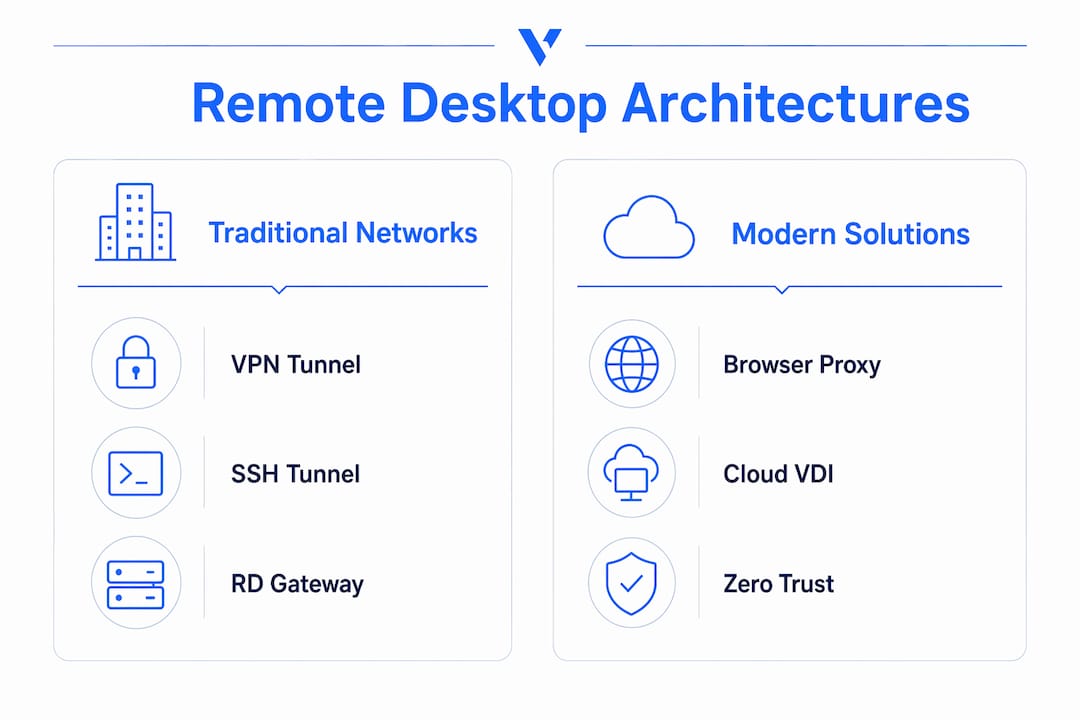
SSH tunnel is a low-cost option for single users with Linux or macOS clients. It works well for developers but lacks the centralized policy controls enterprises need.
Cloud-hosted VDI or app publishing moves the desktop workload off the endpoint entirely. Latency and cost are higher, but the endpoint attack surface shrinks considerably.
Browser-based RDP proxy encapsulates RDP in HTTPS/WebSocket, so no inbound port forwarding is needed. Cloudflare’s analysis confirms this approach reduces the public attack surface while enabling session-level identity verification.

| Architecture | Exposed ports | MFA/SSO support | Deployment effort | Censorship resistance |
|---|---|---|---|---|
| RD Gateway | None (HTTPS only) | Strong | Moderate | Moderate |
| Obfuscated VPN | None | Strong | Low–Moderate | High |
| SSH tunnel | None | Limited | Low | Moderate |
| Cloud VDI | None | Strong | High | High |
| Browser-based proxy | None | Strong | Low–Moderate | High |
Deployment blockers specific to censorship-bypass contexts:
- DPI can fingerprint WireGuard and OpenVPN handshakes without obfuscation enabled.
- NAT traversal failures block inbound connections in many carrier-grade NAT environments.
- Firewall rules at the ISP level may block non-standard ports, making port 443 (HTTPS) the only reliable egress.
Step-by-step setup checklists for common scenarios
Scenario A: RD Gateway (admin baseline)
- Install the Remote Desktop Gateway role on a Windows Server with a valid TLS certificate from a trusted CA.
- Configure Resource Authorization Policies (RAP) and Connection Authorization Policies (CAP) to restrict which users reach which hosts.
- Integrate with your identity provider for SSO and enforce MFA at the gateway level.
- Block direct TCP 3389 access on the physical firewall; allow only HTTPS (443) to the gateway.
- Test by attempting a direct RDP connection to the host — it should fail. Then connect through the gateway and confirm MFA fires.
Scenario B: Obfuscated VPN tunnel
- Place your VPN server in a jurisdiction with reliable egress and low latency to your target region.
- Choose WireGuard for speed or OpenVPN for broader compatibility; enable obfuscation to make traffic look like regular HTTPS browsing.
- Configure split tunneling so only RDP traffic routes through the VPN when full-tunnel is not required.
- Restrict RDP access on the host to the VPN’s internal IP range only.
- Distribute client configs securely; never email them unencrypted.
Scenario C: Browser-based proxied RDP
When inbound port forwarding is blocked or you need clientless access from unmanaged devices, a browser proxy is the right call. Deploy a gateway appliance or cloud service that translates RDP to HTML5/WebSocket. Users authenticate through the browser with MFA; no RDP client is installed on their device.
Controls common to all three scenarios:
- Lock port 3389 to the public internet at the physical firewall.
- Enable NLA on every RDP host.
- Apply Remote Credential Guard or Restricted Admin mode where Kerberos and domain conditions are met — this prevents credential material from reaching the remote host.
- Enforce least-privilege: no one RDPs as a local Administrator.
- Patch the OS within 48 hours of any RDP-related CVE.
Worth knowing: Build a short recovery checklist before you need it: document your out-of-band admin access method (IPMI, console, cloud serial port), and pre-stage emergency VPN credential rotation steps so you are not improvising during an incident.
Why Zero Trust and browser-based proxies are replacing direct RDP exposure
Zero Trust flips the default assumption: nothing is trusted until identity, device posture, and session context are verified. Every session is short-lived and least-privileged. Industry analysis from IGEL describes this shift as continuous verification — device posture and just-in-time access replace the old “inside the perimeter = trusted” model.
For remote desktop specifically, this means:
- Users authenticate with SSO plus MFA before a session token is issued.
- Device posture checks confirm the endpoint is patched and running approved software.
- Just-in-time access grants a time-limited session to a specific host, not broad network access.
- Browser-based proxies add a layer by encapsulating RDP in HTTPS/WebSocket, removing the need for any inbound port forwarding.
For readers in censored regions, the combination of obfuscated transport plus browser-based identity checks is the most resilient pattern. The traffic looks like HTTPS to a DPI sensor, and there is no open RDP port to discover.
Bottom line: Obfuscation alone is not enough. Without identity checks, an attacker who discovers your obfuscated endpoint can still attempt credential attacks. Layer obfuscation with MFA and session logging.
Operational controls and endpoint hardening to pair with a secure tunnel
A secure tunnel protects the transport. The endpoint itself is a separate attack surface.
- Patch on a fixed cadence. RDP is tightly integrated with Windows; OS-level vulnerabilities require rapid patching. Set a policy: critical RDP-related CVEs patched within 48 hours, all others within 14 days.
- Account hygiene. Create a dedicated RDP group; remove the default Administrator account from remote access permissions. Enforce strong, unique passwords and MFA for every account in that group.
- Remote Credential Guard. Where domain Kerberos is available, Remote Credential Guard redirects Kerberos requests back to the client device, so credential derivatives never touch the remote host.
- EDR and disk encryption. Deploy endpoint detection and response on every host accepting RDP connections. Full-disk encryption limits damage if a device is physically compromised.
- Session recording and immutable logs. Organizations that enable server-side session recording can reconstruct lateral movement after a compromise far more quickly than those relying on event logs alone.
Auditor-ready controls checklist: Close port 3389 publicly; enforce NLA and MFA; apply Remote Credential Guard where supported; deploy EDR; enable immutable session recording; restrict RDP to a named group with least-privilege accounts; document patching cadence.
How to validate your setup: testing, monitoring, and incident readiness
Validation is not optional. A misconfigured gateway or a firewall rule that silently fails leaves you exposed without knowing it.
Testing checklist:
- Run an external port scan (using a tool like Shodan or nmap from an outside network) to confirm TCP 3389 is not reachable.
- Attempt authentication without MFA — it should fail at the gateway.
- Validate firewall rules by trying a direct RDP connection to the host IP; it should time out.
- Test your obfuscated VPN from a network that blocks standard VPN ports to confirm DPI resistance.
Monitoring and alerting:
- Collect RDP session logs, gateway access logs, and VPN connection metadata in a centralized SIEM.
- Alert on failed authentication spikes, off-hours logins, and connections from unexpected geographies.
- Retain logs for at least 90 days; compliance frameworks often require longer.
- Schedule a tabletop exercise quarterly: simulate a compromised credential and walk through isolation, revocation, and rotation steps.
Incident response steps:
- Isolate the affected host by removing it from the RDP group or disabling its gateway policy.
- Revoke active session tokens and rotate gateway or VPN credentials immediately.
- Pull immutable session recordings to establish the timeline.
- Notify stakeholders per your incident response plan, then patch or rebuild the host before re-admitting it.
Typical costs and deployment timelines for small teams and enterprises
Budget and timeline vary significantly by architecture choice and team size.
- DIY RD Gateway or self-hosted VPN: Low initial software cost (Windows Server licensing aside), but higher ongoing operational overhead for patching, monitoring, and user support. A single-server setup typically takes 2–14 days depending on certificate procurement and policy configuration.
- Small-team Zero Trust rollout: Subscription cost is higher than a self-hosted VPN, but deployment is faster. Expect 2–8 weeks to cover policy configuration, endpoint enrollment, and user onboarding.
- Enterprise deployment: Factor in policy review, endpoint rollout, and user training. A realistic timeline is 1–3 months or more.
Coalition’s security research shows a strong correlation between internet-exposed RDP and ransomware incidents, with remediation costs consistently exceeding prevention costs. Spending a few hundred dollars per month on a managed Zero Trust or obfuscated VPN service is a straightforward trade-off against a breach that can cost orders of magnitude more.
For teams protecting staff in high-censorship markets, managed business VPN solutions add centralized authentication, device posture checks, and regional server routing without requiring a dedicated security engineer.
Which approach should you choose for your threat model?
| Threat model / Use case | Recommended architecture | Non-negotiable controls |
|---|---|---|
| Single user, censored region | Obfuscated VPN + browser proxy | MFA, no exposed ports, obfuscation enabled |
| Remote worker, privacy-focused | Obfuscated VPN + RD Gateway | MFA, NLA, patched endpoint |
| Small IT team, compliance | RD Gateway + ZTNA overlay | MFA, session recording, least privilege |
| Enterprise, regulated industry | Cloud VDI or SASE/ZTNA | Full endpoint posture, immutable logs, JIT access |
| No admin resources | Managed browser proxy service | MFA enforced by provider, no local config |
When you cannot implement everything at once, prioritize in this order: close the exposed port first, add MFA second, then layer endpoint hardening and logging. Each step meaningfully reduces your attack surface even before the next one is complete.
For readers unsure whether a VPN alone is sufficient, this comparison of VPN vs. Zero Trust covers when each model is the right fit.
Key Takeaways
Closing port 3389 and enforcing MFA through an identity-aware gateway or obfuscated VPN are the two controls that eliminate the vast majority of remote desktop attack surface.
| Point | Details |
|---|---|
| Close port 3389 first | Block direct RDP on the physical firewall before any other change; this alone removes automated scanning exposure. |
| MFA through the gateway | Enforce multi-factor authentication at the gateway or VPN level, not just on the host account. |
| Obfuscate for censorship-bypass | Standard VPN transports are detectable by DPI; obfuscated tunnels disguise traffic as HTTPS to bypass censorship. |
| Enable session recording | Immutable server-side logs are often the decisive factor in post-compromise investigations. |
| Veilock for managed bypass | Veilock’s obfuscated transports, AES-256-GCM encryption, and no-logs policy provide a managed path for readers who need censorship-resistant remote access without self-hosting infrastructure. |
Note: If you are bypassing censorship from the United States or accessing systems in restricted jurisdictions, verify your use case against current U.S. export and re-export regulations before deploying.
The trade-offs most guides skip over
The conventional advice — “just use a VPN” — misses the real decision. A standard VPN protects the transport but does nothing about an exposed port, weak credentials, or an unpatched endpoint. And in censorship-heavy environments, a vanilla VPN is often the first thing blocked.
The more useful frame is: what is your actual threat? For most readers here, it is a combination of network-level surveillance, credential attacks, and the risk of being discovered at all. That combination points toward obfuscated transport plus identity-aware access, not either one alone.
Full VDI gives you the smallest endpoint attack surface but adds latency and cost that most individual users and small teams cannot justify. Tunneled RDP with a gateway is the practical middle ground: you keep control of your desktop environment, you eliminate the exposed port, and you add the identity layer that stops credential attacks. Browser-based proxies are the right call when you genuinely cannot accept inbound connections — which is common in carrier-grade NAT environments and in countries where ISPs actively block VPN handshakes.
The measure of success is simple: no exposed ports on an external scan, and access controls that are tested, not assumed.
Veilock handles the obfuscation and privacy layer for you
If the setup checklists above look like more infrastructure than you want to manage, Veilock is built for exactly this situation. It combines AES-256-GCM encryption with obfuscated transports that disguise VPN traffic as regular HTTPS, making it resistant to DPI-based blocking in restrictive countries. A strict no-logs policy means your session metadata is never stored or exposed.
Veilock’s censorship-bypass features include Vortex threat blocking, DNS-over-HTTPS, and a global server network optimized for high-censorship regions. Plans start at a low monthly cost. To get started, create a trial account, connect a test endpoint, and run an external port scan to confirm your RDP port is no longer visible before rolling out to additional devices.
Authoritative references and further reading
- How to Mitigate the Risks of Internet-Exposed RDP — Coalition security research on RDP exposure and ransomware correlation.
- What are the security risks of RDP? — Cloudflare overview of RDP attack vectors including credential attacks and port exposure.
- Browser-based RDP: a safer way to offer remote desktop sessions — Cloudflare on HTTPS/WebSocket encapsulation and Zero Trust session controls.
- Securing Remote Desktop (RDP) for System Administrators — UC Berkeley Information Security Office baseline guidance.
- Remote Credential Guard — Microsoft Learn documentation on credential protection during RDP sessions.
- Adaptive secure desktop — IGEL on continuous device posture verification and just-in-time access models.
- Remote desktop session auditability — LynxTrac on immutable session recording for post-compromise investigations.
- What Is VPN Obfuscation? — Veilock technical explainer on DPI evasion and obfuscated transports.
Related reading on Veilock
About the author
Veilock Team · Veilock