Unblock Social Media: Fast Ways to Get Back Online
By Veilock Team · Veilock · Published July 24, 2026 · Updated August 28, 2026 · 17 min read

The fastest way to unblock social media right now is to switch to mobile data. If that restores access, the block is network-level and a trusted paid VPN will solve it reliably. For quick web-only viewing without installing anything, an HTTPS web proxy works in a pinch, though it carries real security tradeoffs.
- Mobile data or personal hotspot: The simplest test. Turn off Wi-Fi, enable your phone’s hotspot, and try again. If it works, the restriction lives on the local network, not your account.
- Trusted paid VPN: The best balance of privacy, reliability, and app-level access. Encrypts your traffic and routes it through a server outside the filtered network. Setup takes minutes.
- HTTPS web proxy: Quick web-only access with no installation. Useful for a single page view, but not safe for account logins or persistent use.
One caveat: Bypassing a network filter at school or work may violate acceptable-use policies, and circumventing government-mandated blocks carries legal risk in some countries. If your account is suspended by the platform itself, no tool will restore access. That requires an appeal through official support channels.
Tor Browser (available at torproject.org) is a legitimate option when anonymity matters more than speed. It routes traffic through multiple relays for strong privacy, but it is noticeably slow and many social platforms block Tor exit nodes. Use it for safety-critical situations, not everyday scrolling.
Table of Contents
- Is the block on your device, your network, or your account?
- How VPNs unblock social media and what to check before you subscribe
- When should you use Tor Browser instead of a VPN?
- Are web proxies and browser extensions worth using?
- Advanced bypass methods: who actually needs them?
- When a VPN cannot help: account bans vs network blocks
- How do you choose the safest method for your situation?
- Step-by-step: set up a VPN and verify your access
- What is the recommended approach for most people?
- Key Takeaways
- The Veilock team’s perspective on layered access
- Veilock: private, censorship-resistant access starting at $4.46/month
- Useful sources and further reading
Is the block on your device, your network, or your account?
Before installing anything, spend two minutes ruling out simple causes. The answer shapes which fix you actually need.

Step 1: Try the platform’s web version in a browser instead of the app. App-specific errors sometimes point to a cached credential or a corrupted install, not a network block.
Step 2: Open the same site on a different device connected to the same Wi-Fi. If both fail, the block is likely network-wide. If only one device fails, the issue is local to that device.
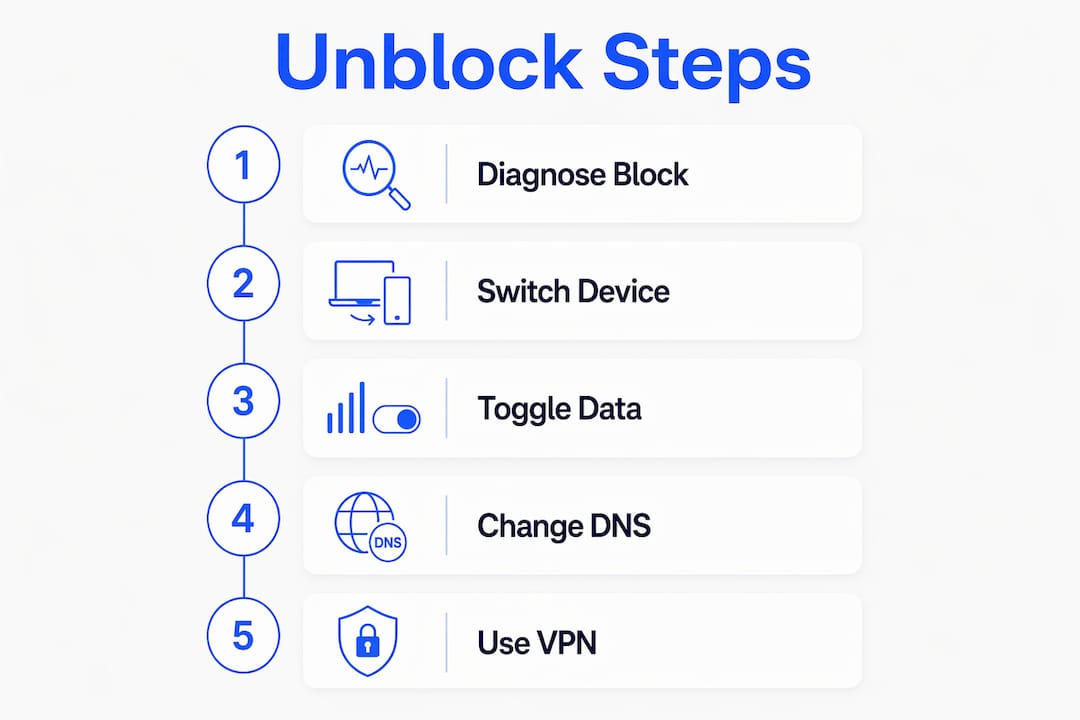
Step 3: Turn off Wi-Fi and load the page over mobile data. Switching to mobile data is the fastest way to confirm a network-level restriction. Works on mobile data but not Wi-Fi? The local network or its DNS filter is the culprit.
Step 4: Try a different DNS server. Many schools and workplaces block domains at the DNS layer. Changing your device’s DNS to a public resolver like Cloudflare (1.1.1.1) or Google (8.8.8.8) sometimes restores access without a VPN. Go to your device’s network settings, find the DNS field, and swap in the alternate address. DNS switching bypasses simple domain filters but does nothing against deep packet inspection or IP-level blocks.
The core principle: Never enter your username or password on an unfamiliar proxy page while troubleshooting. If a site you do not recognize asks for credentials to “verify” your identity, close it immediately. Credential theft is the most common risk at this stage.
How VPNs unblock social media and what to check before you subscribe
A VPN creates an encrypted tunnel between your device and a server in another location. To your school router, workplace firewall, or ISP, your traffic looks like a generic HTTPS connection to the VPN server. The destination — Instagram, WhatsApp, Telegram, or any other platform — is hidden. That is why a VPN solves URL-based blocks, IP-based blocks, and geo-restrictions in one step.
When a VPN helps and when it does not:
- Works for network-level URL blocks, IP blocks, and geo-restrictions (including watching US Netflix abroad or accessing region-locked streaming services).
- Does not fix platform-imposed account suspensions. If Instagram or WhatsApp banned your account, a VPN changes nothing.
- Will not override a managed-device policy that blocks VPN apps at the operating-system level.
Security features worth checking before you pay
Not all VPNs offer the same protection. Before subscribing, confirm the provider has:
- Kill switch: Cuts your internet connection if the VPN drops, so your real IP never leaks.
- DNS leak protection: Keeps DNS queries inside the encrypted tunnel.
- No-logs policy: The provider should not store records of which sites you visited or when.
- AES-256-GCM encryption: The standard for secure tunneling. AES-256 encryption is currently considered unbreakable by brute force.
- Obfuscation / DPI resistance: Disguises VPN traffic so deep packet inspection cannot identify and block it. Critical for restrictive networks like school firewalls or countries with aggressive censorship.
The free VPN problem
Free VPNs frequently log user traffic and monetize it through data brokers or targeted advertising. Many lack obfuscation, use weaker encryption, and run overcrowded servers that throttle speeds. For account-sensitive logins to Instagram, WhatsApp, or Telegram, a free service is a genuine liability.
Paid VPN subscriptions typically run $3–$10 per month. Veilock’s plans start at $4.46/month and include AES-256-GCM encryption, obfuscation for DPI-resistant connections, DNS-over-HTTPS, a kill switch, and a strict no-logs policy. Setup from signup to first connection takes under five minutes.
VPN vs proxy vs Tor: a quick comparison
| Feature | VPN | Web Proxy | Tor Browser |
|---|---|---|---|
| Encryption | Strong (AES-256) | Varies (often weak) | Strong (layered) |
| Speed | Fast to moderate | Moderate to slow | Slow |
| Anonymity | Moderate (depends on provider) | Low | High |
| App-level access | Yes | Browser only | Browser only |
| Streaming support | Yes (with right server) | Rarely | No |
| Safe for logins | Yes (paid, reputable) | No | Use with caution |
When choosing a server location, pick one geographically close to you for speed, unless you specifically need a US IP to watch US Netflix abroad or access a region-locked service. Distance adds latency.
When should you use Tor Browser instead of a VPN?
Tor routes your traffic through a series of volunteer-operated relays before it exits to the open internet. Each relay knows only the previous and next hop, making it very difficult to trace traffic back to you. That architecture is genuinely powerful for anonymity. It is also why Tor is slow.
For social media access specifically, Tor has real practical limits. Many platforms actively block known Tor exit nodes. Media-heavy apps like Instagram and TikTok load poorly or not at all. Logging into an account over Tor can trigger security challenges, since the exit node’s IP is flagged as suspicious.
Pros:
- Strong anonymity without paying for a service.
- Bypasses many network-level filters.
- Free and open-source, maintained by the Tor Project.
Cons:
- Noticeably slow, especially for video or image-heavy feeds.
- Social platforms frequently block Tor exit nodes.
- Login attempts may trigger account security reviews.
- Not suitable for streaming or real-time apps.
When Tor is the right call: You are in a situation where anonymity is the priority, speed is secondary, and you are not logging into an account that could be flagged. Journalists, activists, and researchers in high-surveillance environments often use Tor for this reason.
When a VPN is better: Everyday access to Instagram, WhatsApp, or Telegram on a school or work network. A VPN is faster, more compatible with apps, and easier to configure.
If you use Tor Browser, do not resize the browser window. Tor’s default window size is part of its fingerprint-resistance design. Resizing makes your session more identifiable.
Are web proxies and browser extensions worth using?
Web proxies route your browser traffic through an intermediary server, masking your IP from the destination site. They require no installation and work immediately. That convenience is real, and it is also the limit of their usefulness.
What proxies do well:
- Quick access to a single blocked page without installing software.
- Useful for viewing public content (news articles, public social profiles) on a filtered network.
- No account or subscription required.
Where they fall short:
| Attribute | Web Proxy | Browser Extension Proxy | Reputable Paid VPN |
|---|---|---|---|
| Covers all apps | No (browser only) | No (browser only) | Yes |
| Encrypts all traffic | Rarely | Sometimes | Yes |
| Safe for account logins | No | Risky | Yes (reputable provider) |
| Ad injection risk | High (free sites) | Moderate | Low |
| Persistent use | Poor | Moderate | Reliable |
Free proxy pages frequently inject ads and may not encrypt your session properly. Some capture session cookies, which can expose your account without you ever entering a password. The risk is highest on sites you have never heard of.
If you want a browser-based option, look for an extension from a provider with a published privacy policy, a clear no-logs statement, and a track record. Even then, treat it as a temporary measure for non-sensitive browsing, not a replacement for a full VPN when you need to unblock Instagram or access WhatsApp in China.
Advanced bypass methods: who actually needs them?
Standard tools fail in a narrow set of situations: highly restrictive networks using deep packet inspection, countries with sophisticated censorship infrastructure like the Great Firewall of China, or professional workflows managing multiple accounts simultaneously. Advanced methods exist for those cases.
The main options:
- Obfuscated / stealth VPN connections: The VPN traffic is disguised to look like ordinary HTTPS. Most users in restrictive countries need this. Veilock’s obfuscation feature is built specifically for DPI-resistant connections.
- Shadowsocks / SSH tunneling: Lightweight proxies originally developed to bypass the Great Firewall. Effective but require manual configuration and some technical comfort.
- Residential proxies: Route traffic through real residential IP addresses, making detection harder. Used primarily by social-media professionals managing many accounts.
- Cloud-phone environments: Virtual Android or iOS instances running in a data center. Useful for multi-account management without device fingerprinting.
- Anti-detect browsers: Browsers that spoof device fingerprints to prevent platform-level tracking across sessions.
Who actually needs these: Professional social-media managers, researchers operating in high-censorship environments, and people running multiple accounts for legitimate business reasons. For the average person trying to access Instagram at school or unblock WhatsApp while traveling, a standard obfuscated VPN is sufficient.
Advanced tools increase complexity and cost, and misconfiguration raises the chance of detection. A residential proxy or cloud-phone environment that is set up incorrectly can flag your account faster than a basic VPN would. Start with the lightest fix that works, and escalate only when needed.
Pro Tip: Before moving to advanced tools, confirm you have tried: mobile data, a trusted paid VPN with obfuscation enabled, a DNS switch, and basic browser troubleshooting. Most blocks resolve at one of those steps.
When a VPN cannot help: account bans vs network blocks
This distinction matters more than most guides acknowledge. A VPN changes your network path. It does nothing to your account status on the platform.
Signs you are dealing with a network block:
- The site loads fine on mobile data but not on Wi-Fi.
- You see a generic “this site is blocked” or connection timeout message.
- Other users on the same network have the same problem.
- Switching DNS or using a proxy restores access.
Signs you are dealing with an account or platform ban:
- You see a specific error message from the platform (“Your account has been suspended,” “This account has been disabled”).
- The problem follows you across networks and devices.
- You can visit the platform’s homepage but cannot log in.
- You receive repeated verification requests or security challenges.
Platform-imposed bans cannot be bypassed with a VPN or proxy. WhatsApp, for example, addresses bans only through the in-app “Request review” feature. Instagram handles account appeals through its in-app support flow or the web-based Help Center. Using a VPN to log in on a suspended account does not restore it and may complicate the appeal.
What to do if your account is banned:
- Document the error message and any notification you received.
- Use the platform’s official in-app “Request review” or “Appeal” option.
- Submit through the web Help Center if the in-app option is unavailable.
- Be patient. Platform reviews typically take days to weeks, and outcomes are not guaranteed.
Do not create a new account to replace a banned one before the appeal resolves. Most platforms detect duplicate accounts and may extend the restriction to the new account as well.
One short legal note: circumventing network restrictions at school or work may violate your institution’s acceptable-use policy, and in some countries, bypassing government-mandated blocks carries legal penalties. Confirm the rules that apply to your situation before proceeding.
How do you choose the safest method for your situation?
The right tool depends on four questions. Work through them in order.
Ask yourself:
- Am I on a managed device (school laptop, work computer)? If yes, VPN apps may be blocked at the OS level. Mobile data on your personal phone is the safest starting point.
- Is the block network-level or account-level? (See the section above.) Account-level blocks require appeals, not tools.
- Do I need app-level access or just web viewing? Proxies and browser extensions cover web-only. A VPN covers both.
- Is anonymity or speed more important? Tor for anonymity, VPN for speed and reliability.
Red flags to avoid:
- Free VPNs that do not publish a clear no-logs policy.
- Proxy pages that ask for your username and password.
- Browser extensions requesting permissions to read all your browsing data.
- Providers with no published jurisdiction or privacy policy.
Questions to ask any VPN provider:
- Do you have a verified no-logs policy?
- Is there a kill switch?
- Do you offer DNS leak protection?
- Do you support obfuscation for DPI-resistant connections?
- Where are your servers, and how many locations do you cover?
- What jurisdiction governs your data practices?
Veilock’s feature checklist covers all of these. The censorship-bypass page specifically addresses obfuscation and DPI resistance for restrictive networks.
Method comparison by use case
| Method | Network block | Geo-block | Anonymity priority | App access | Safe for logins |
|---|---|---|---|---|---|
| Mobile data | Yes | No | No | Yes | Yes |
| Paid VPN | Yes | Yes | Moderate | Yes | Yes |
| Tor Browser | Yes | Partial | High | No | Use with caution |
| Web proxy | Partial | Partial | Low | No | No |
| Cloud phone | Yes | Yes | High | Yes | Yes (complex) |
Step-by-step: set up a VPN and verify your access
This walkthrough applies to any reputable paid VPN. The steps are the same whether you are trying to unblock Instagram, access Telegram, or watch US Netflix abroad.
- Choose a provider with a verified no-logs policy, kill switch, DNS leak protection, and obfuscation support. Check that it has servers in the country whose content you need.
- Sign up and download the app for your device (Windows, macOS, iOS, Android). Most providers support simultaneous connections on multiple devices.
- Enable the kill switch before connecting. Find it in the app’s settings. This step is easy to skip and important not to.
- Select a server. For unblocking a local network restriction, any server outside that network works. For geo-restricted content (US Netflix, region-locked streaming), pick a server in the target country.
- Connect. The app will show a confirmation when the tunnel is active.
- Test on the web version first. Open a browser and navigate to the platform’s web address. A successful load confirms the VPN is routing traffic correctly.
- Test the app. Open Instagram, WhatsApp, Telegram, or whichever app you need. If it loads, you are done.
- Run a DNS leak test. Visit a DNS leak test site (search “DNS leak test”) and confirm that the DNS server shown matches your VPN provider’s location, not your ISP’s. A leak means your DNS queries are still going through your local network.
Troubleshooting common post-connection issues:
- Slow speeds: Switch to a server closer to your physical location, or try a different VPN protocol. WireGuard is generally faster than OpenVPN. See VPN protocols explained for a breakdown.
- App still blocked: Some apps detect VPN IP ranges. Enable obfuscation in the VPN settings, or switch to a different server. Check the provider’s list of apps that block VPNs for known workarounds.
- DNS leak detected: Toggle the kill switch off and on, or switch protocols. If the leak persists, contact your VPN provider’s support.
- Connection drops repeatedly: Check for a firewall on your device blocking the VPN app. On managed devices, this may not be fixable without admin access.
After connecting, always check the web version of the platform before the app. Web versions are faster to load and confirm the VPN is working before you spend time troubleshooting the app.
What is the recommended approach for most people?
For the majority of readers on a filtered school, work, or public Wi-Fi network, the path is straightforward. Start with mobile data. If that restores access, the block is local and a trusted paid VPN with obfuscation will handle it reliably. Reserve Tor Browser for situations where anonymity is the priority and speed is not. Advanced tools like residential proxies or cloud phones are for professional workflows, not everyday use.
- Try mobile data or a personal hotspot first. It costs nothing and takes 30 seconds.
- If mobile data works, a paid VPN is the right long-term fix for filtered Wi-Fi.
- If neither works, check whether the issue is an account ban, not a network block.
- Account bans require platform appeals, not bypass tools.
- Respect your institution’s policies and local law before circumventing any restriction.
Key Takeaways
A trusted paid VPN with obfuscation is the most reliable way to unblock social media on filtered networks, but mobile data is always the fastest first test.
| Point | Details |
|---|---|
| Try mobile data first | If the platform loads on mobile data but not Wi-Fi, the block is network-level and a VPN will fix it. |
| Paid VPN beats free options | Free VPNs often log traffic and lack obfuscation; a paid provider with a no-logs policy is safer for account logins. |
| Account bans need appeals | A VPN cannot restore a suspended account; use the platform’s official “Request review” process instead. |
| Match the tool to the threat | Use Tor for anonymity-first situations; use a VPN for everyday speed and app compatibility. |
| Veilock | Offers AES-256-GCM encryption, obfuscation, DNS-over-HTTPS, a kill switch and a no-logs policy starting at $4.46/month. |
The Veilock team’s perspective on layered access
The most common mistake people make when trying to access blocked social media is reaching for the most complex tool first. Someone locked out of Instagram at school installs a residential proxy or downloads a sketchy free VPN, when switching to their phone’s hotspot would have solved it in 20 seconds. Complexity is not a signal of effectiveness.
What actually works is a layered approach: lightest fix first, escalate only when the previous step fails. Mobile data, then a paid VPN with obfuscation, then Tor or advanced tools for specific professional or safety-critical needs. That sequence reduces risk at every step because each layer is proportionate to the actual restriction you are facing.
The other thing worth saying plainly: free VPN services are not a neutral option. They are a business, and if you are not paying, your traffic data is often the product. For anything involving account credentials, that is an unacceptable tradeoff. A paid provider with a published no-logs policy and a transparent jurisdiction is not a luxury. It is the baseline.
Veilock was built around exactly this use case: people on restrictive networks who need reliable, private access without the complexity of enterprise tools. The censorship-bypass features and no-logs architecture reflect that. For readers who want to go deeper on the technical side, the censorship blog covers specific country scenarios and protocol-level details.
Veilock: private, censorship-resistant access starting at $4.46/month
If you have worked through this guide and want a VPN that checks every box on the checklist above, Veilock is worth a direct look. It was designed specifically for censorship bypass, not retrofitted for it. AES-256-GCM encryption, DPI-resistant obfuscation, DNS-over-HTTPS, a kill switch, and a strict no-logs policy are all included at every plan level.
Plans start at $4.46/month. Setup takes under five minutes on any device. For travelers trying to watch US Netflix abroad, expats needing to access WhatsApp, or anyone on a filtered network who needs reliable app-level access, Veilock’s global server network covers the locations that matter. The Vortex threat-blocking feature adds a layer of protection against malware and trackers at the network level, with no extra configuration required.
Check the full feature list and pricing to confirm it fits your situation, then connect in minutes.
Useful sources and further reading
Authoritative documentation and technical resources for readers who want to verify claims or go deeper on specific tools and methods.
- Tor Browser download — Official Tor Project download page. The only safe source for the Tor Browser.
- WhatsApp Help Center: Request review for bans — Official WhatsApp documentation on how to appeal an account ban through the in-app review process.
- Great Firewall — Wikipedia — Background on China’s internet censorship infrastructure, useful for understanding why obfuscation is necessary in some countries.
- VPN features and use cases — Full feature breakdown covering encryption, kill switch, DNS leak protection, and obfuscation.
- Censorship-bypass feature page — Specific documentation on DPI resistance and obfuscated connections for restrictive networks.
- VPN obfuscation explained — Technical primer on how obfuscation works and when you need it.
- Veilock: how VPNs bypass geo-restrictions — Explains the mechanics of geo-unblocking and how a VPN changes your apparent location.
- VPNs in restrictive countries — Case studies and operational notes on bypassing sophisticated censorship infrastructure.
- Apps and websites that block VPNs — Practical guide to which platforms detect VPNs and how to work around detection.
- Veilock: unblocking apps at school — Step-by-step example of bypassing school-network filters, applicable to social media access.
Related reading on Veilock
About the author
Veilock Team · Veilock